

And turned it into a competitive advantage before their team even reposted the teaser.
Yesterday, Klue’s CEO posted a teaser on LinkedIn:
"...tomorrow, we're dropping something that's going to change how teams understand why they win and lose deals. Excited for this one."
Now, this is the kind of post that can spin a lot of companies into panic mode.
People scramble. Slack threads pop. Screenshots fly. The “we should probably update the battlecard” moment begins.
Not with Crayon. With Crayon you can be automatically plugged in to all the moves your competitors are making, as well as figure out how to respond.
Let me walk you through the steps we took over here at Crayon.
Step One: Unleash the Power of Compete Signal Analysis with Crayon Sparks
Truthfully, we already knew this launch was coming.
Over the past few weeks, Crayon has been surfacing a mix of signals like subtle copy changes, new themes in blog content, and things we’d been hearing on calls. Nothing concrete, but enough to make us pay attention.
So when Klue’s CEO posted that teaser on LinkedIn, it didn’t catch us off guard. It confirmed what Crayon had already identified.
Right after seeing the post, I ran a quick Spark (Sparks is our AI research and analysis tool). To be fair, I could’ve waited for Crayon to surface it automatically, but I was too curious.
Here’s the actual prompt I used:%20(4).png?width=1800&height=1200&name=Stylized%20Images%20(Shannon%20+%20Kimp)%20(4).png)
Nothing fancy. Not exactly Pulitzer-worthy prompt engineering. 😅
But I knew Sparks would know what to do. And it did. Sparks pulled together the full picture by analyzing the last 30 days of Klue’s activity across all our data sources and came back with this prediction:%20(5).png?width=1800&height=1200&name=Stylized%20Images%20(Shannon%20+%20Kimp)%20(5).png)
Step Two: Validate the Signal
Sparks didn’t guess. It saw the writing on the wall.
That prediction was backed by weeks of signals we had already captured.
Messaging shifts. Content themes. Sales call chatter. Threads in Slack.
Our team runs automated Sparks on a regular cadence and they’ve been picking up on these patterns for a while. Each one lands in our internal Slack channels, so we’re always a step ahead of what’s shifting in the market.
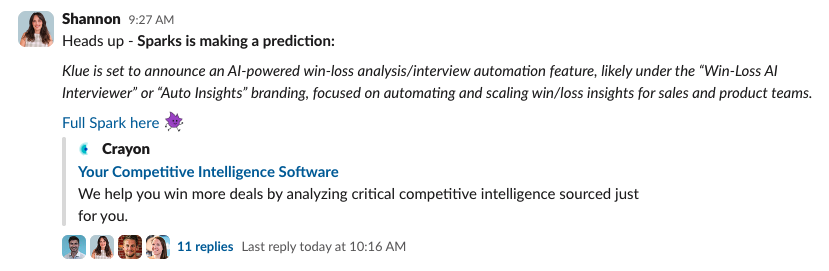
This wasn’t a surprise. It was a trend we’d been watching build. Once I saw the Spark analysis, I dropped it into our compete Slack channel. That message kicked off a quick thread with the team. It started as a heads-up, and turned into action.
Step Three: Build the Response
After a quick back-and-forth with our CPO and Director of Sales in Slack, I asked Sparks to generate some counter-positioning we could use in the field.
Here’s the prompt I used:
Klue is poised to announce a new feature. Use the information you have about this feature and create 2–3 concise counter-positioning talk tracks that our sales and CS teams can use as quick dismisses.
Sparks delivered exactly what I needed. We had short, clear talk tracks that directly addressed the announcement and gave our reps a confident way to handle it.
This is another example of how Sparks can be used — not just for trend tracking or automation, but for creating hyper-specific content in the moment.
I made a couple of quick edits using a new feature we’ve been testing internally: Sparks Refine.
AI can get you 90% of the way there, but sometimes you want to clean up the voice, sharpen the tone, or reword a line before sharing it with your team. Sparks Refine made that part easy — no rewriting from scratch, just quick adjustments to make the Spark ready to publish.
More on Sparks Refine coming soon 👀
Step Four: Enable the Field. Instantly.
Within minutes, the counter-positioning talk tracks were live on our Klue battlecard.
I also dropped the Spark output directly into our compete Slack channel, so the whole team could see it and start using it immediately.%20(6).png?width=1800&height=1200&name=Stylized%20Images%20(Shannon%20+%20Kimp)%20(6).png)
And because this is Crayon — not just a static portal — that new insight showed up everywhere reps already work:
- ChatGPT
- Slack
- Salesforce
- Microsoft Teams
- Crayon Compete Hub
- Crayon Answers
- And yes, even inside the Klue battlecard itself
No new tools. No extra logins. No "check the portal when you get a chance."
Just relevant, timely messaging, delivered where it matters.
This is why sellers actually use the content we publish.
Step Five: Stay One Step Ahead
The initial response was just the beginning.
That Spark, along with all future updates from our competitor, is now tied to a live, automatically updating battlecard. As they roll out more announcement content in the coming days, Crayon will capture it and add it to our compete system without any manual lift.
That same intel also appears in Crayon Answers, our Gen-AI compete assistant. So when a rep asks something like:
“Tell me about the feature Klue is going to release GA tomorrow”
%20(8).png?width=1800&height=1200&name=Stylized%20Images%20(Shannon%20+%20Kimp)%20(8).png)
Answers already knows what they’re referring to and surfaces the latest insight. That includes the Spark, the context, and the talk tracks they need to win.
Through our API-powered ChatGPT integration, that same intelligence is also available directly inside your company’s ChatGPT instance. Reps can ask in plain language, without having to search a portal, and get a compete-ready response based on the latest intel.
Now, the big question – was Crayon correct? Did we accurately predict Klue's product update? Sure did!
The Proof.....

The Real Advantage
This wasn’t just about a competitor launching a new feature.
It was about seeing the move before it happened and helping our team respond with confidence. While other companies are waiting to hear what a competitor is up to, Crayon customers are already picking up on the signals, spotting the patterns, and preparing their teams.
If You’re Wondering…
- What intel is hiding in plain sight on your competitors site, blog, YouTube, or call data
- Where your sales team is falling behind because they don’t have the latest intel
- Or what it actually looks like to enable reps with AI, not silo’ed competitive content
We’ll show you how to spot the signal early, shape the story fast, and deliver the talk track before your competitor even hits publish.


Seeing is believing! Check out Crayon for yourself.

Related Blog Posts



Popular Posts
-
 Sales Battlecards 101: How to Help Your Sellers Leave the Competition In the Dust
-
 How to Create a Competitive Matrix (Step-by-Step Guide With Examples + Free Templates)
-
 The 8 Free Market Research Tools and Resources You Need to Know
-
 6 Competitive Advantage Examples From the Real World
-
 Crayon Launches First Competitive Intelligence MCP Server